

What Is Cross-Docking and What Technology Makes It Work?
Cross-docking is a warehouse and logistics strategy where products are received, sorted, and moved directly to outbound shipping with little or no long-term storage.
Instead of bringing products into a warehouse, putting them on shelves, picking them later, and then shipping them out, cross-docking is built around speed. Products come in one side of the facility and move back out as quickly as possible.
That sounds simple, but the real question is this:
How do you actually make cross-docking work without creating chaos at the dock?
For cross-docking to work well, your team needs more than a good layout. You need fast scanning, accurate labels, real-time visibility, clear workflows, and the right technology at the points where products move.
How Cross-Docking Works
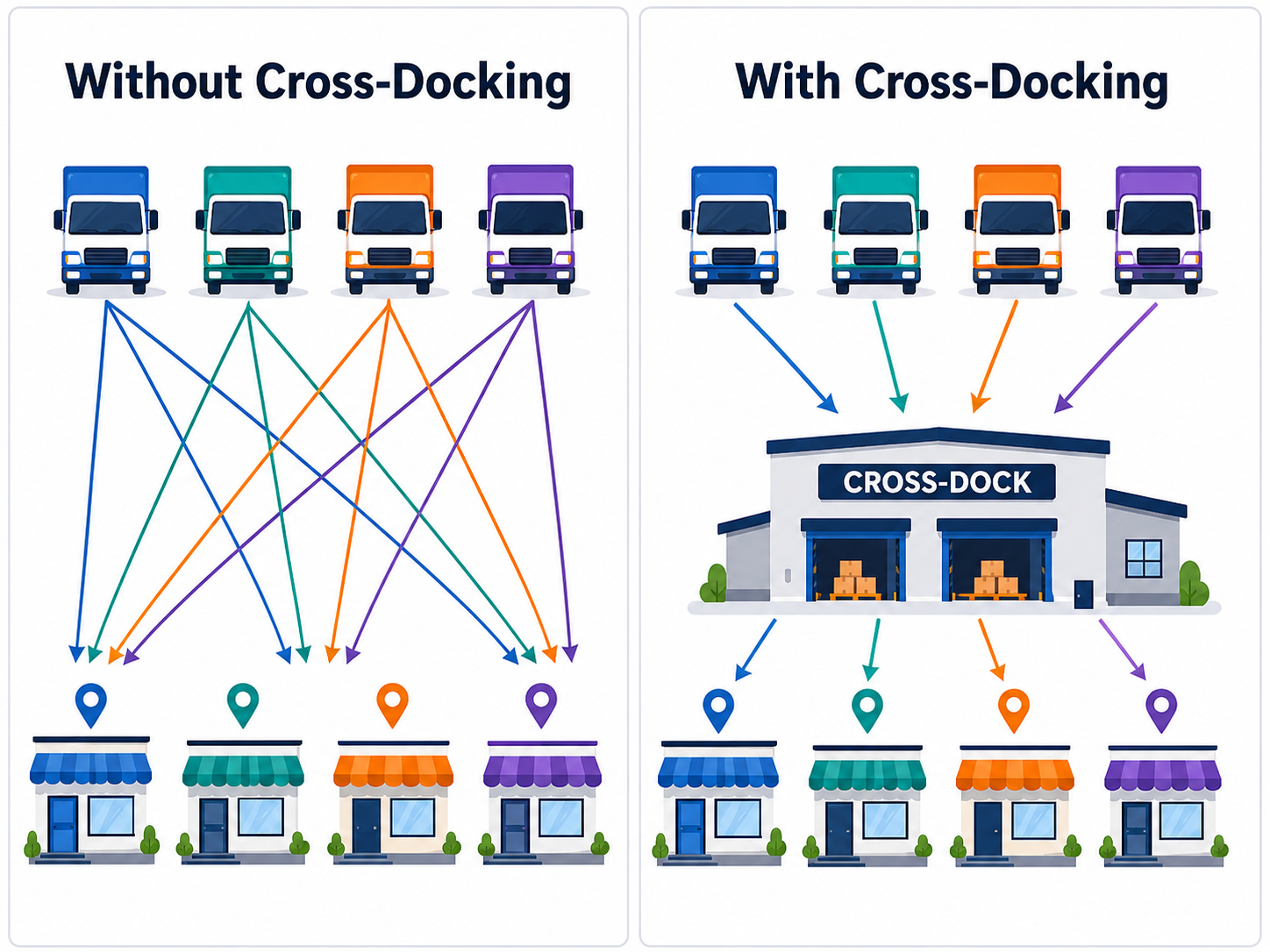
In a traditional warehouse flow, products are received, stored, picked, packed, and shipped later.
In a cross-docking flow, storage is reduced or removed from the process. Products are received, identified, sorted, staged if needed, and moved to the correct outbound truck, route, customer, or location.
The goal is to reduce extra handling and keep products moving.
Cross-docking is often used when speed matters, inventory moves quickly, or products do not need to sit in storage. It can help reduce storage space, shorten fulfillment time, and lower the amount of labor spent moving products in and out of shelves.
But it only works if the operation is organized.
If workers do not know what came in, where it needs to go, or whether the right items were loaded, cross-docking can quickly turn into delays, errors, and dock confusion.
What Makes Cross-Docking Hard?
Cross-docking puts pressure on the receiving and shipping process.
Products may arrive from different suppliers, carriers, or locations. They may need to be sorted quickly. Some items may need new labels. Others may need to be verified before they move outbound.
That creates a few common challenges:
Products need to be identified fast
Labels need to be accurate and scannable
Workers need clear instructions
Inventory data needs to update quickly
Outbound loads need to be verified before they leave
Dock doors, staging areas, and routes need to stay organized
The problem is not the idea of cross-docking. The problem is trying to run a fast-moving process with slow or disconnected tools.
That is where barcode scanning, RFID, mobile computers, labeling systems, and warehouse software can make a difference.
Barcode Scanning Keeps Products Moving

Barcode scanning is one of the simplest ways to keep cross-docking organized.
When products arrive, workers can scan labels to confirm what came in, match items to purchase orders or shipment data, and move products toward the right outbound destination.
Barcode scanning can also help during staging and loading. Workers can scan cartons, pallets, bins, or shipment labels before items leave the dock. That helps reduce wrong shipments, missed items, and manual checking.
In a cross-docking environment, speed matters. But accuracy matters just as much.
A fast process with bad data only moves mistakes faster.
Mobile computers, handheld scanners, and wearable scanners can help workers capture the right data while they are moving through receiving, staging, and shipping.
RFID Helps Speed Up High-Volume Movement

RFID can be especially useful when products are moving quickly and scanning one barcode at a time slows the process down.
With RFID, tagged items can be read without a direct line of sight. That can help teams verify pallets, totes, cases, equipment, or shipments faster than manual barcode scanning alone.
RFID can support cross-docking by helping teams:
Track items as they move through receiving and shipping
Verify shipments faster
Reduce manual scans during high-volume movement
Improve inventory visibility
Catch missed or misplaced items before they leave
RFID is not always needed for every cross-docking operation, but it can be valuable when volume, speed, and visibility are major concerns.
If you want to see how RFID can fit into your warehouse, click here to learn how to get started with RFID.
RFID Portals Can Add Dock Door Visibility
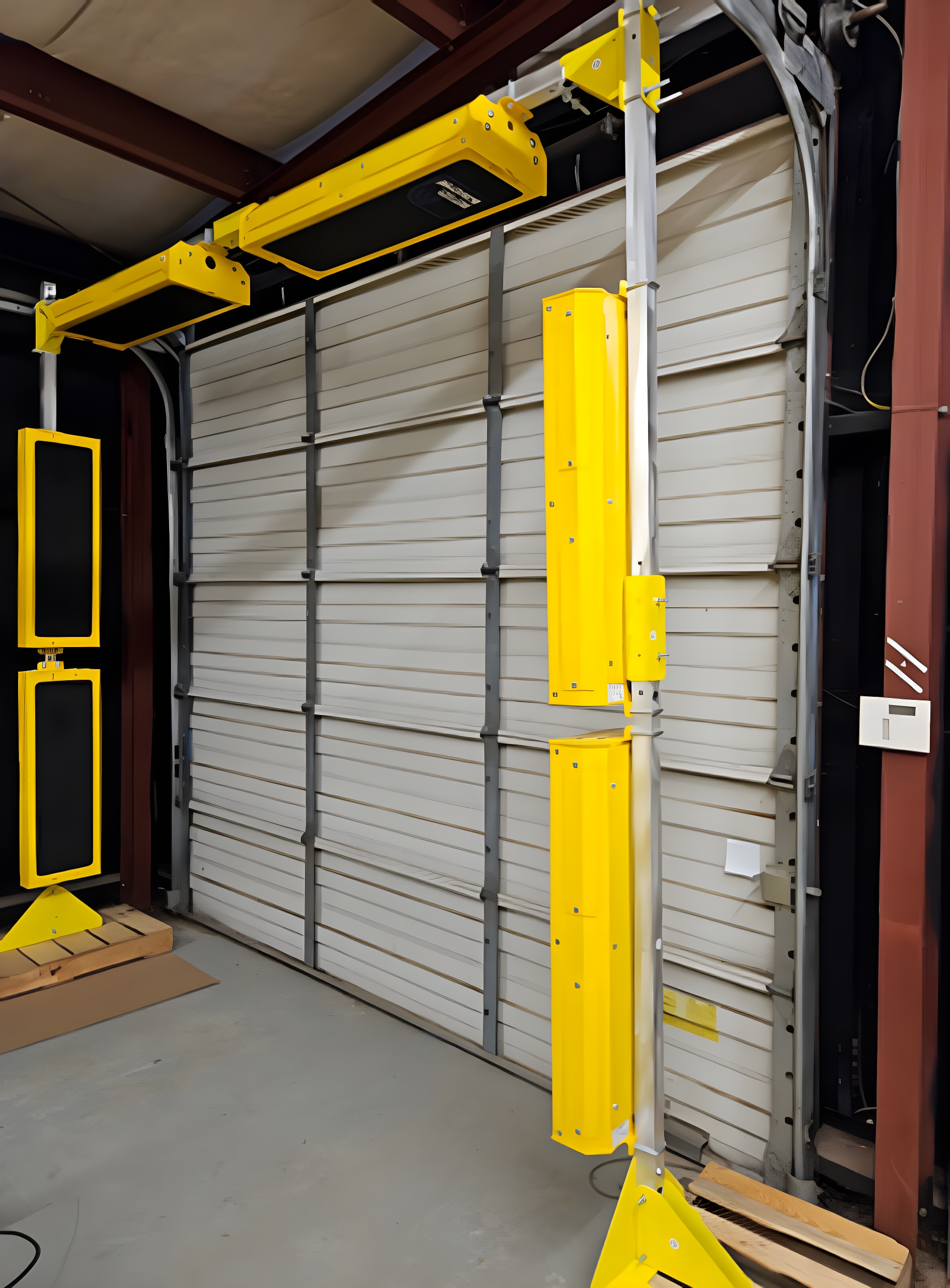
Dock doors are one of the most important points in a cross-docking operation.
Products come in, products go out, and your team needs to know what moved through each point.
RFID portals can help by automatically reading tagged items as they pass through a defined area, such as a receiving door, shipping door, conveyor lane, or staging point.
That can be useful for cross-docking because the system can capture movement without requiring every item to be scanned by hand.
For example, an RFID portal at a dock door can help confirm that tagged products moved through the right location at the right time. That gives the operation better visibility into what arrived, what shipped, and what may need attention.
This is where RFID can go beyond basic tracking. It can help create real-time movement data that supports faster decisions on the warehouse floor.
Labeling Still Matters in Cross-Docking

Cross-docking depends on labels being right the first time.
If an inbound label is missing, damaged, unreadable, or not tied to the correct data, the process slows down. Workers may need to stop, research the shipment, print a new label, update the system, or manually route the product.
That can break the whole point of cross-docking.
Strong labeling processes help make sure products can be identified quickly as they move from receiving to outbound shipping.
This can include:
Barcode labels
RFID labels
Shipping labels
Pallet labels
Routing labels
Compliance labels
Supplier labels
Supplier labeling is especially important. If products arrive with accurate labels from the start, receiving teams can move faster and relabel less.
If supplier labeling is slowing down receiving, click here to learn how better supplier labeling compliance can help.
Software Connects the Movement to the System
Hardware captures the data, but software helps your team use it.
Cross-docking works best when movement data is connected to the systems your team already relies on. That may include warehouse software, RFID software, inventory systems, dashboards, alerts, or other operational tools.
The goal is not just to scan more things. The goal is to know what is happening in real time.
RFID software can help turn tag reads into usable information. It can support shipment verification, dock door visibility, inventory movement, alerts, reports, and workflow automation.
That matters because cross-docking leaves less room for delay.
If something is missing, misrouted, or loaded incorrectly, your team needs to know before the shipment leaves.
If your team is also looking at better warehouse visibility, click here to learn how automation, RFID, and AI can help keep your warehouse up to date.
FAQ
-
Cross-docking is a logistics process where products are received, sorted, and moved directly to outbound shipping with little or no long-term storage. The goal is to reduce handling, speed up fulfillment, and keep products moving through the supply chain.
-
The main benefit of cross-docking is faster product movement. It can reduce storage time, lower handling, shorten fulfillment timelines, and help businesses move inventory more efficiently.
-
Common cross-docking technology includes barcode scanners, mobile computers, RFID readers, RFID portals, label printers, warehouse software, RFID software, and real-time inventory visibility tools.
-
RFID can help teams read tagged items faster, verify shipments, track movement through dock doors, reduce manual scanning, and improve real-time visibility as products move through the facility.
-
Labels are important because workers need to identify products quickly. If labels are missing, unreadable, inaccurate, or not connected to the right data, cross-docking can slow down and create mistakes.
-
Cross-docking often works best in retail, distribution, e-commerce, food and beverage, manufacturing, transportation, store replenishment, and other fast-moving inventory environments.
-
Cross-docking may not be the best fit for products that require long inspections, customization, special handling, unpredictable demand, or extended storage before shipping.

Where Barcode Factory Can Help
Barcode Factory can help businesses build the technology foundation needed for better cross-docking workflows.
That may include barcode scanners, mobile computers, wearable scanners, RFID readers, RFID portals, RFID software, label printers, barcode labels, RFID labels, and the tools needed to capture and manage movement data.
The right setup depends on your workflow!
Some teams may only need better barcode scanning and labeling at receiving and shipping. Others may need RFID portals at dock doors, mobile computers for real-time updates, or RFID software to improve shipment visibility.
Barcode Factory can help you choose the right hardware, software, labels, and data capture tools to keep products moving without creating more confusion at the dock.
Fill out the form below or contact us to talk to an expert!